Miss a day.
Keep your progress.
A habit tracker for iPhone that forgives. One miss never resets anything, rest is a real day, and Mostly is the top level.
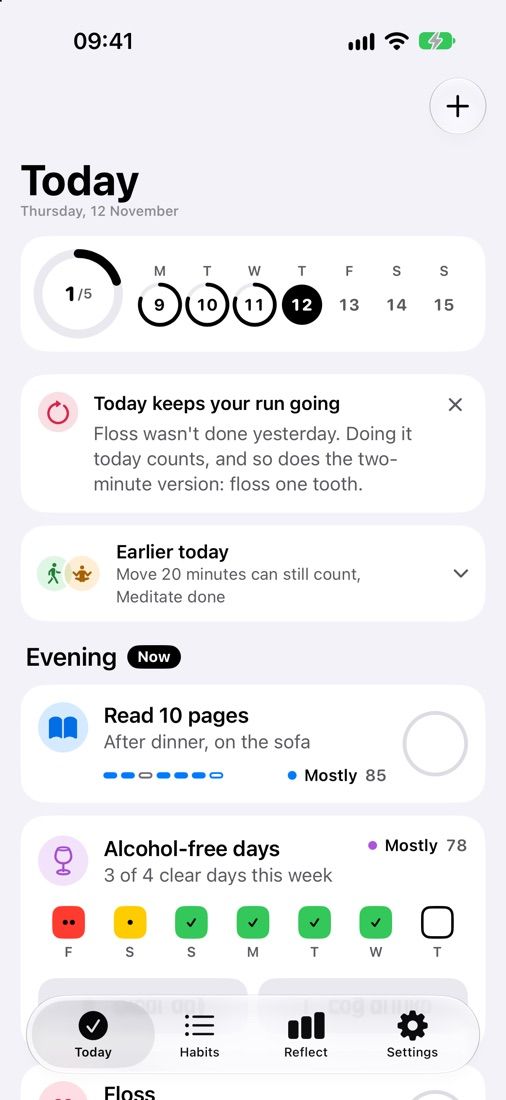
One miss, nothing reset. Your level dips a few points and your run keeps going.
Taps cycle done, missed, rest. Or try a pattern:

- Free to start
- No account
- No tracking
- For iPhone
Why Mostly
Aim for Mostly, not perfect.
Streak apps count days until you miss one. Mostly Daily measures how often you show up, and never asks for 100%.
Four levels. Mostly is the top.
Starting, Sometimes, Often, Mostly. There is nothing above Mostly, so there is nothing to lose.
Never miss twice.
Your run counts the days you didn’t miss twice in a row. One slip changes nothing; the day after is what matters.
Rest is a real day.
Rest, low energy and travel days are not misses. Finish a week at Often or Mostly and you earn an extra rest day.
Read more: why one missed day doesn’t break a habit and rest days.
Widgets
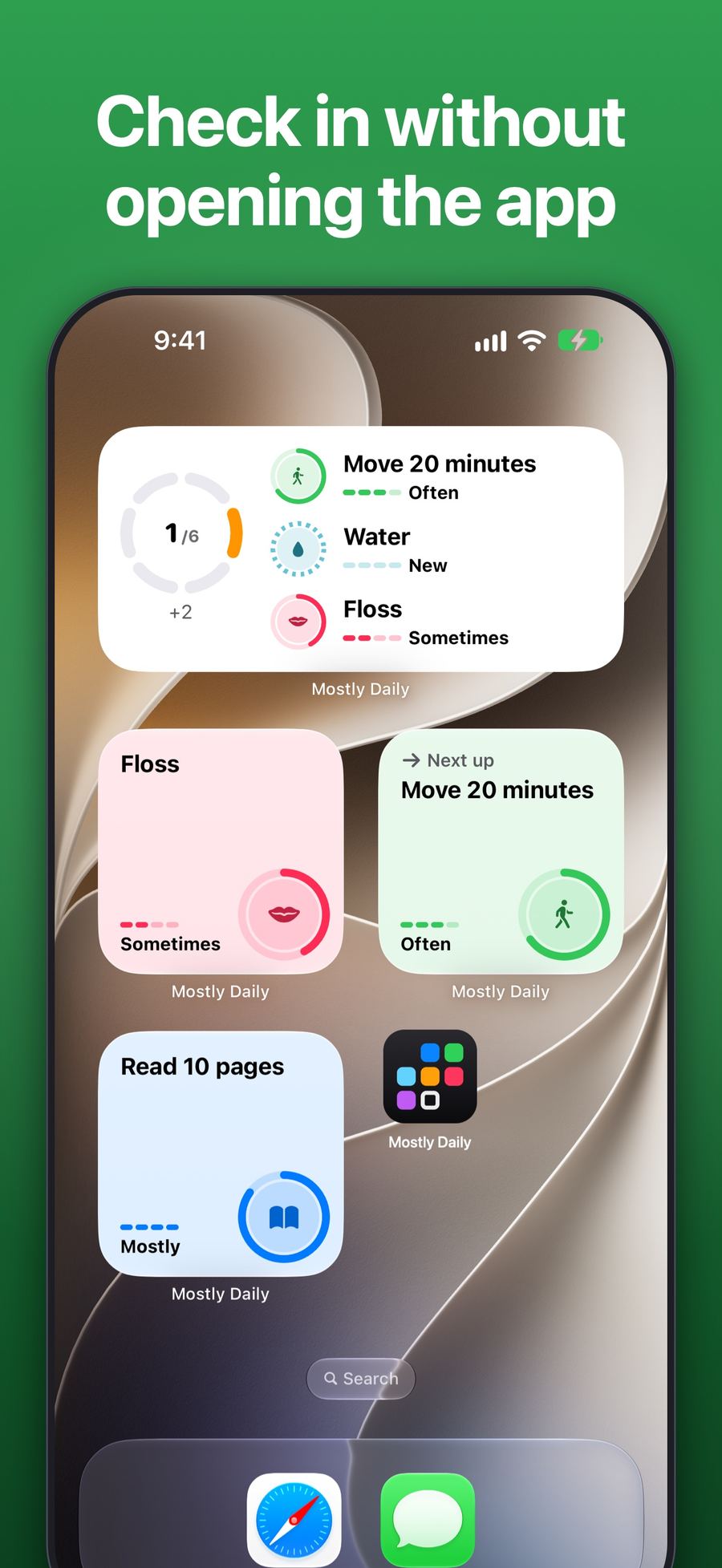
Tap. Done. No app to open.
One tap on the ring and the habit is done; a second tap undoes it. Home Screen, Lock Screen, StandBy, Control Center and Siri.
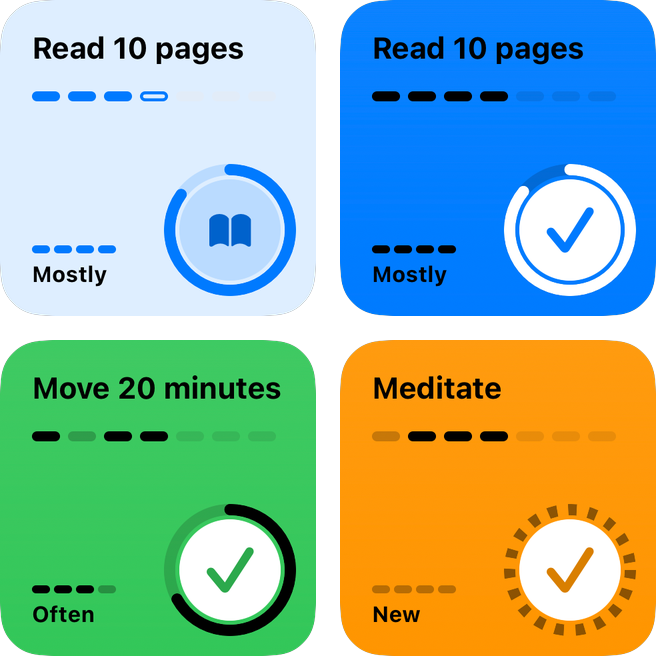
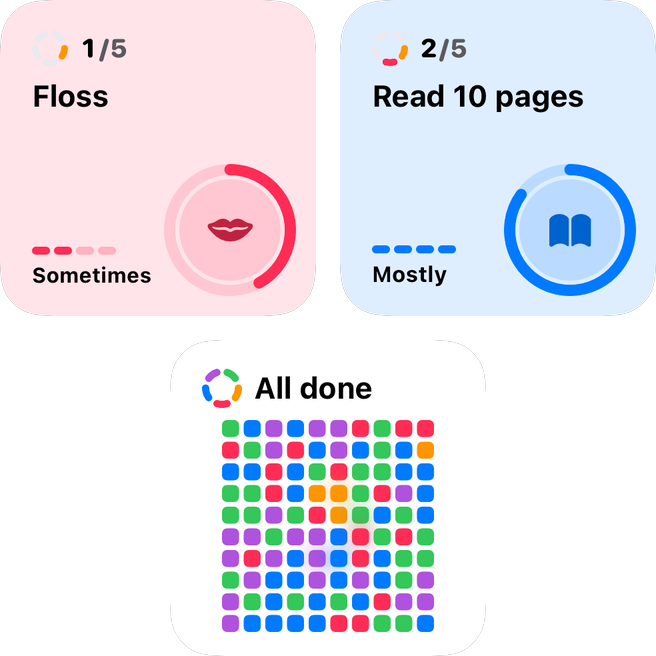
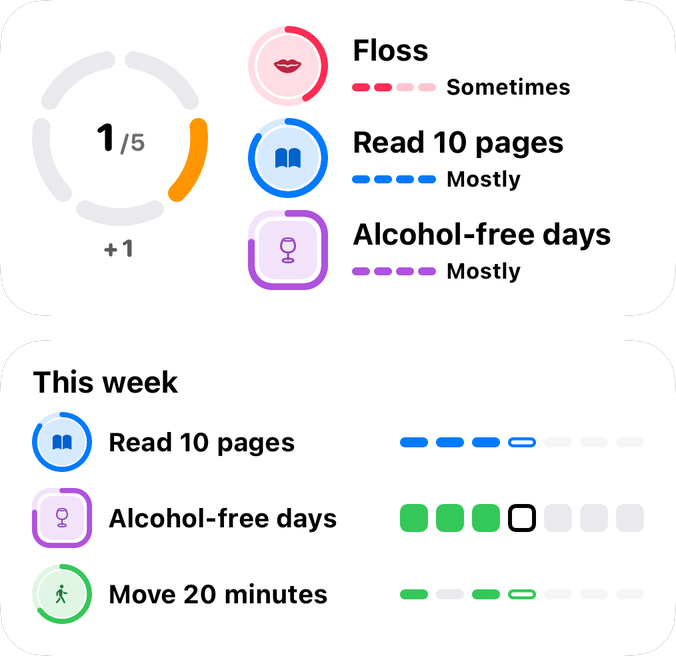


Lock Screen and StandByThe day above the clock, what’s next, and one habit you can tap without unlocking. Tinted and clear widgets stay legible.
Two kinds of habit
Habits you build.
Habits you want less of.
Build
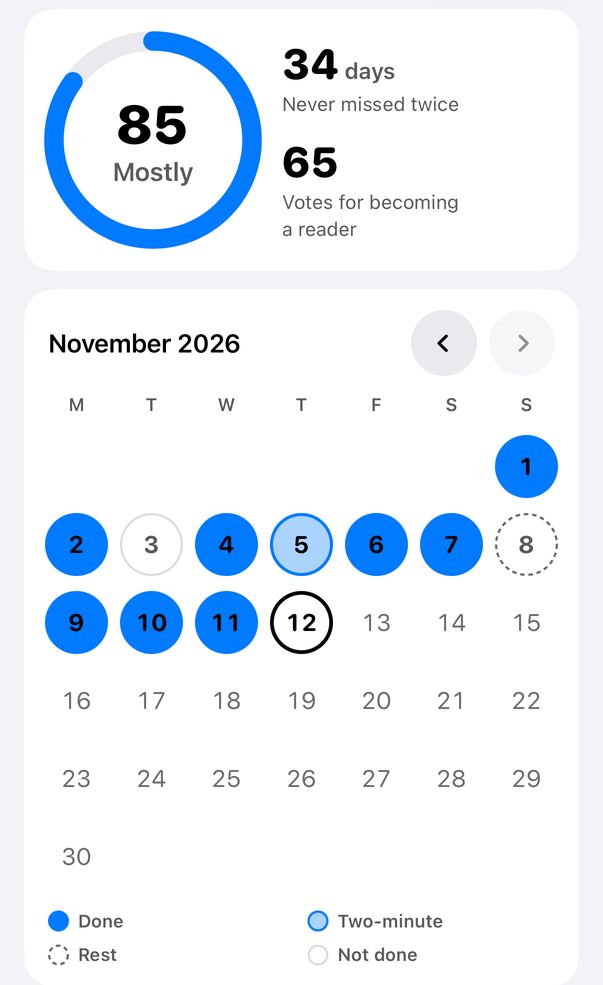
Start tiny. Step up when it feels easy.
Yes or no, a count, or minutes. Keep a two-minute version for busy days; it counts fully. When a step has felt routine for a few weeks, the app offers the next one. Nothing changes by itself.
- Apple Health can check off steps, workouts, sleep, water and more. Coming in 1.1.2: choose what you do, like a run, yoga or a swim, and the habit checks itself off. You can also count distance in km or miles. Also coming in 1.1.2: “Ideas from Apple Health” looks at your last 30 days and suggests habits you already do, and four wellbeing habits check themselves off: Close my rings, Get outside, In bed by 23:00 and Check in with how I feel
- Write when and where: “after dinner, on the sofa”
Limit
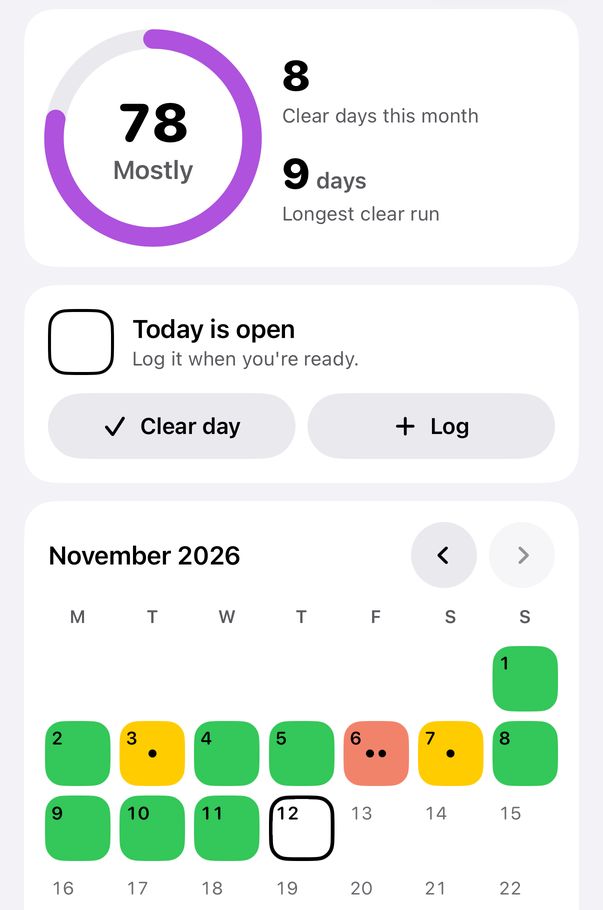
A calendar of clear days, not a count of days since.
Drinks, sugar, screen time. Log the amount in the evening and get a colour calendar: clear, lighter, heavier. Set a goal of clear days a week. No judgement, just the picture.
- Adding one? Pick “Do less” at the top of the new-habit sheet, or start a name with “Less” or “Stop”
- Note what a day was about: Social, Unwinding
- Set up your space with up to three small steps
- Self-tracking only. It gives no medical advice.
Who you’re becoming
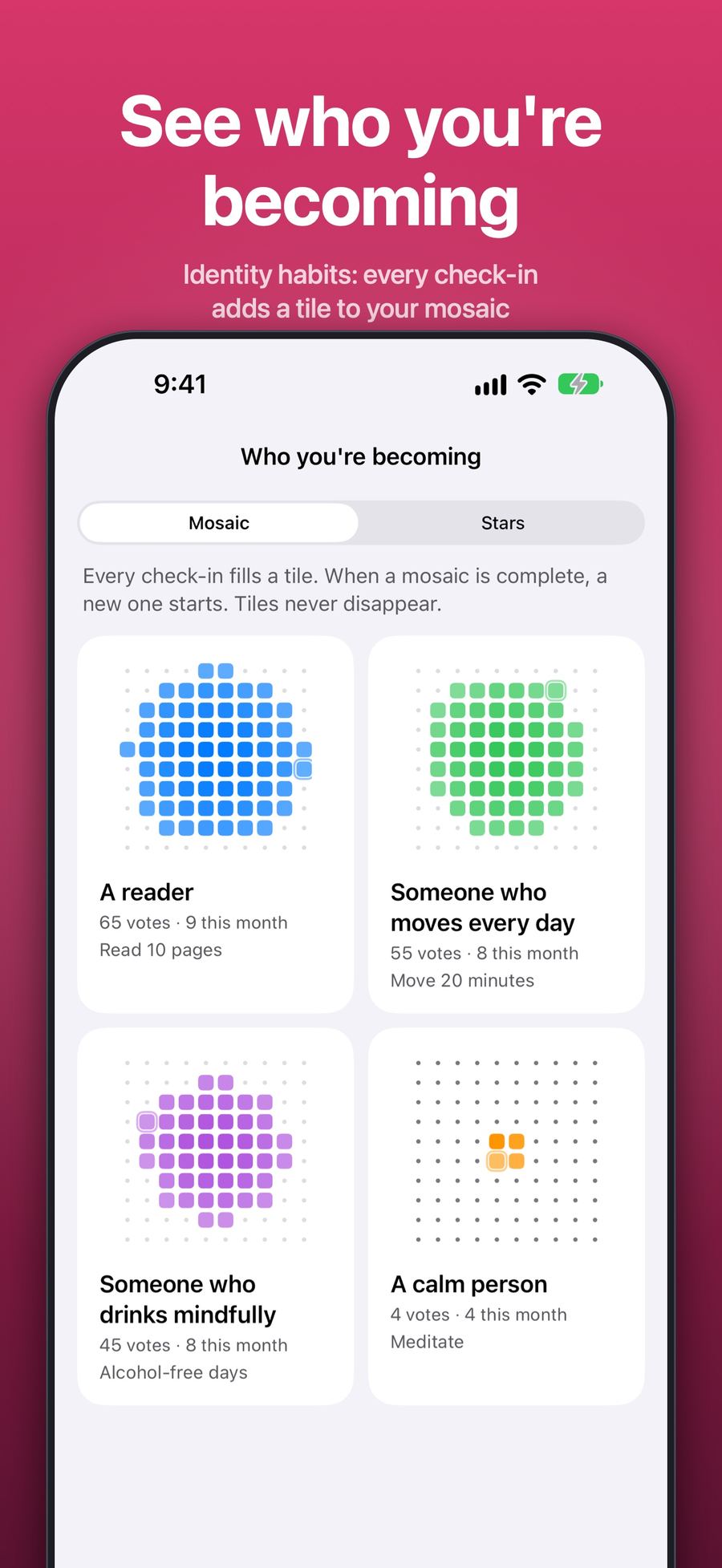
Every check-in is a vote.
A reader. Someone who moves. Each check-in lands one tile in the habit’s colour. Tiles are never taken away: a miss leaves no hole, because a tile is something you did, not a day you were judged on.
- Each week, Reflect tells your week in kind wordshabit by habit, with the next small step.
- Once a quarter: still who you want to become?Keep, Adjust or Let go. Letting go only archives.
- Seasonal challenges with a finish linelike Clearer January. The goal is most days, never every day.
Privacy
Nothing leaves your phone unless you say so.
No server, no account, no analytics. Your habits sync through your own iCloud. Export everything as CSV on any plan; delete everything with one tap.
- No account, ever.No sign-in, no e-mail, no ads, no tracking.
- Health data stays on the device.Check-ins that come from Apple Health, and the drinks you log, are never put in iCloud.
- Yours to keep.Export as CSV any time, on any plan. Premium never locks your data.
Pricing
Free that stays free.
Start with Free. Try Premium free for two weeks when you want more. If Premium ends, nothing is deleted.
Free
No time limit
- 3 habits, one of them can be a Limit habit
- Levels, never miss twice, rest and time off
- Every widget surface: Home Screen, Lock Screen, StandBy, Control Center, Siri
- Reminders with a Done button
- Apple Health, iCloud sync, CSV export
- This week’s reflection and the season’s challenge
Premium
2-week free trial · yearly, monthly or lifetime
- Unlimited habits, 5 in focus at a time
- Every past reflection, recap and identity review
- Change any earlier day on a habit’s calendar
- Plan up to 4 steps ahead; the full challenge library
- More widgets, two reminder times per habit
- Themes and app icons
Premium Family: Premium for you and up to 5 family members through Apple Family Sharing. No accounts, no invites; everyone’s habits stay private on their own devices.
Everything, line by line
- Free: Your day (list what you do, mark each line, turn one into a habit)
- Free: Set up your space, up to 3 small steps per habit, like “Shoes by the door”
- Free: habit steps, one next step at a time, stepping up or back
- Free: change the last 7 days on a habit’s calendar: today and the six days before
- Free: the last 4 weeks of your line on a habit’s detail; Premium: 10 weeks
- Free: the season’s challenge, when it opens (7 days before the month to the 14th), and its share picture
- Free: what a Limit day was about, and this month’s count; Premium: earlier months
- Free: price and usual amount on a Limit habit, exported with your data
- Premium: what you didn’t spend on a Limit habit, against your usual week
- Premium: plan your next steps, up to 4 steps ahead on a habit
- Premium: the challenge library, 10 challenges, any time, 28 days each
- Premium: widgets Today and week, Month calendar, This week, Who you’re becoming
- Premium: a suggested better reminder time
- Premium: themes (Graphite is included; Midnight, Ocean, Plum and Glacier are Premium) and app icons
- Premium: if Premium ends, nothing is deleted
Questions
Honest answers.
What happens when I miss a day?
Nothing is reset. Your level dips a little and comes back just as fast when you check in again. Your run of "never missed twice" only ends after two misses in a row.
Do I need an account?
No. There is no account and no sign-in. Your habits stay on your devices and sync through your own iCloud.
What if I hit the 3-habit limit on Free?
Free has 3 habits, and Premium has unlimited habits with Focus mode keeping 5 in focus at a time. When a new habit would go over, a note on the form says so before you add it, and offers "Pause a habit…". Pick one to pause: its history and level are kept, it waits under Paused, and you can resume it any time. Nothing is deleted.
What happens if Premium ends?
Nothing is deleted. Habits beyond the Free plan are paused with all their history, and you can export everything at any time.
Can I change an earlier day?
Yes. On a habit's calendar you can change today and the six days before it, and every earlier day stays readable. Premium (and the 2-week trial) lets you change any earlier day too. Earlier days look faded with a small lock on Free, and nothing is ever removed.
Is it a treatment or recovery program?
No. Mostly Daily is for self-tracking and gives no medical advice. If you're worried about your health or drinking, please talk to a professional.
More in Support and the guides: habit steps, Limit habits, themes, challenges and the quarterly review.
Mostly is enough.
- Add a habit
- Put a widget on your Home Screen
- Miss a day now and then
Free to start · No account · No tracking